Gujarat Education · સવાલ-જવાબ
Gujarat GCC Exam 2026: ટાઈપ/સ્ટેનો (Government Commercial Certificate) પરીક્ષા માટે અરજીની છેલ્લી તારીખ 25 નવેમ્બર
GCC એ ગુજરાત રાજ્ય પરીક્ષા બોર્ડની ટાઈપ/સ્ટેનો (Government Commercial Certificate) પરીક્ષા છે. 2026 ની પરીક્ષા માટે sebexam.org પર 25 નવેમ્બર 2026 સુધી online અરજી કરી શકાય છે. અરજીમાં Institute Name અને Outward Number જરૂરી છે, એટલે પહેલાં તમારા typing/shorthand institute નો સંપર્ક કરો.
- સમય
- અરજીની છેલ્લી તારીખ 25-11-2026
- સાથે રાખો
- Institute Name + Outward Number (institute પાસેથી) + passport size photo + ઉમેદવારની વિગતો (જન્મતારીખ, mobile)
તમારી પાસે શું છે?
Smartphone છે
-
Institute પાસેથી વિગતો લોતમારા typing/shorthand institute પાસેથી Institute Name અને Outward Number મેળવો
-
sebexam.org ખોલો"Apply Online" માં "Government Commercial Certificate Examination (GCC)" સામે Apply દબાવો
-
Exam Type અને Student Type પસંદ કરોતમારી ટાઈપ/સ્ટેનો પરીક્ષા અને વિદ્યાર્થી પ્રકાર સાચો પસંદ કરો
-
Form ભરોInstitute Name, Outward Number અને વ્યક્તિગત વિગતો ભરી submit કરો
-
Photo upload કરો"Upload Photograph" માં ફોટો upload કરી preview તપાસો
-
Application confirm કરો"Confirm Application" માં confirm કરો અને Confirmation Number નોંધો
-
Fee ભરો અને receipt લો"Print Application/Challan" અથવા "Fees Payment" થી ફી ભરો અને "Print Receipt" માંથી e-receipt સાચવો
Smartphone નથી
-
Institute પર જાઓતમે જ્યાં ટાઈપ/સ્ટેનો શીખો છો તે institute ની મદદથી અરજી કરાવો
-
Photo અને વિગતો સાથે રાખોPassport size photo, જન્મતારીખ અને mobile number
-
Confirm અને fee ખાતરી કરોઅરજી confirm થઈ અને ફી ભરાઈ તેની receipt ની print લો
કોઈની મદદ જોઈએ
-
Institute નો સંપર્ક કરોExam Type, Student Type અને Outward Number માટે institute જ પહેલો સંપર્ક છે
-
SEB helpline પર ફોન કરો(079) 232 48462 — કામકાજના દિવસે 10:30 થી 6:00
-
GCC User manual વાંચોsebexam.org ના Apply Online page પર "How to Apply" માં GCC User manual છે
અટકી ગયા?
Outward Number ખબર નથી
તમારા institute પાસેથી જ મળશે; અંદાજે નંબર ન ભરો
Exam Type સમજાતો નથી
Institute અથવા જાહેરનામામાંથી તમારી ટાઈપ/સ્ટેનો પરીક્ષા ચકાસો
ફી કપાઈ પણ receipt નથી મળી
થોડા સમય પછી અથવા બીજા દિવસે "Print Receipt" માં ફરી તપાસો
Form ભર્યું પણ confirm નથી કર્યું
"Confirm Application" માં જઈ confirm કરો, નહીંતર અરજી પૂર્ણ નહીં ગણાય
Photo યોગ્ય દેખાતો નથી
"Upload Photograph" માં ફરી upload કરી preview તપાસો
સંપૂર્ણ વિગત વાંચો
ગુજરાત રાજ્ય પરીક્ષા બોર્ડે જીસીસી (ટાઈપ/સ્ટેનો) પરીક્ષા 2026, એટલે કે Government Commercial Certificate Examination, માટે online અરજી શરૂ કરી છે. આ ટાઈપિંગ અને સ્ટેનોગ્રાફી (લઘુલિપિ) નું સરકારી પ્રમાણપત્ર મેળવવા માટેની પરીક્ષા છે. State Examination Board ના official portal પર અરજીની છેલ્લી તારીખ 25 નવેમ્બર 2026 દર્શાવવામાં આવી છે.
આ પરીક્ષા ખાસ કરીને Government Commercial Certificate મેળવવા ઇચ્છતા ઉમેદવારો માટે મહત્વપૂર્ણ છે. અરજી કરતા પહેલાં પરીક્ષાનો પ્રકાર, વિદ્યાર્થીનો પ્રકાર, institute સંબંધિત વિગતો અને official notification ધ્યાનથી ચકાસવી જરૂરી છે.
માહિતી તપાસેલી: 19 નવેમ્બર 2026
GCC Exam 2026: Quick Information
| મુદ્દો | સત્તાવાર માહિતી |
|---|---|
| પરીક્ષા | Government Commercial Certificate Examination |
| સત્તાવાર સંસ્થા | State Examination Board, Gandhinagar |
| સરકાર | Government of Gujarat |
| Application Mode | Online |
| Last Date | 25 November 2026 |
| Official Portal | sebexam.org |
| Advertisement No. | રાપબો/જીસીસી/ઓક્ટોબર-૨૦૨૬//૧૦૬૩૧-૭૩ |
| Portal પર ઉપલબ્ધ પ્રક્રિયા | Apply Online, Photograph Upload, Confirm Application, Print Application/Fee Pay, Hall Ticket, Receipt, Result |
| પરીક્ષાનો પ્રકાર | ટાઈપ / સ્ટેનો (Typing / Shorthand) |
| Helpline | (079) 232 48462 (કામકાજના દિવસે 10:30–6:00) |
| How to Apply | sebexam.org પર “GCC User manual” |
State Examination Boardના official portal પર GCC Examination માટે ઉપરોક્ત deadline અને application workflow દર્શાવવામાં આવ્યા છે.
Government Commercial Certificate Examination શું છે?
GCC એ રાજ્ય પરીક્ષા બોર્ડ દ્વારા લેવાતી ટાઈપ (typing) અને સ્ટેનો (shorthand/લઘુલિપિ) ની પરીક્ષા છે. Board ના Notice Board પર તેને “જીસીસી (ટાઈપ/સ્ટેનો) પરીક્ષા” તરીકે દર્શાવવામાં આવી છે, અને આ પરીક્ષા અંગે તા. 10/12/2020 ના સરકારી ઠરાવનો પણ ઉલ્લેખ છે. કયા વિષય, ભાષા અને speed માટે પરીક્ષા આપી શકાય તે જાહેરનામામાં દર્શાવેલ “GCC Exam Type” મુજબ નક્કી થાય છે.
Government Commercial Certificate Examination, જેને GCC તરીકે દર્શાવવામાં આવે છે, માટે ગુજરાત રાજ્ય પરીક્ષા બોર્ડ official online application system ચલાવે છે.
આ portal પર ઉમેદવાર માટે અલગ અલગ તબક્કા દર્શાવવામાં આવ્યા છે:
- Apply Online
- Upload Photograph
- Confirm Application
- Print Application / Fee Pay
- Print Hall Ticket
- Print Receipt
- Print Result
આથી અરજી પ્રક્રિયા માત્ર form ભરવા સુધી મર્યાદિત નથી. ઉમેદવારે application confirmation, fee payment, receipt અને પછી hall ticket સંબંધિત તબક્કા પણ પૂર્ણ કરવા પડે છે.
GCC Exam 2026 માટે છેલ્લી તારીખ
Official State Examination Board application listing મુજબ:
25 નવેમ્બર 2026
આ તારીખ GCC Examination application માટે દર્શાવવામાં આવી છે. છેલ્લી તારીખ પછી application window બંધ થઈ શકે છે, તેથી ઉમેદવારોએ છેલ્લી તારીખની રાહ ન જોવી.
કોણ અરજી કરી શકે?
Official portal પર GCC application માટે નીચેની વિગતો માંગવામાં આવે છે:
- GCC Exam Type
- GCC Student Type
- Institute Name
- Outward Number
આથી આ પરીક્ષા માટે application processમાં institute-related details મહત્વપૂર્ણ છે. જોકે ઉપલબ્ધ official public page પર સંપૂર્ણ eligibility criteria, age limit, qualification, subject-wise conditions અથવા category-wise rulesનો સંપૂર્ણ લખિત સારાંશ દર્શાવવામાં આવ્યો નથી.
તેથી ઉમેદવારે:
- official notification ખોલવી,
- પોતાના GCC Exam Type અને Student Typeની યોગ્ય પસંદગી કરવી,
- instituteની વિગતો સાચી ભરવી,
- અને કોઈ શંકા હોય તો સંબંધિત institute અથવા State Examination Boardની official માહિતીનો આધાર લેવો.
આ લેખમાં એવી eligibility શરતો ઉમેરવામાં આવી નથી જે જાહેર official page પરથી સ્પષ્ટ રીતે ચકાસી શકાય તેવી નથી.
GCC Exam માટે અરજી કેવી રીતે કરવી?
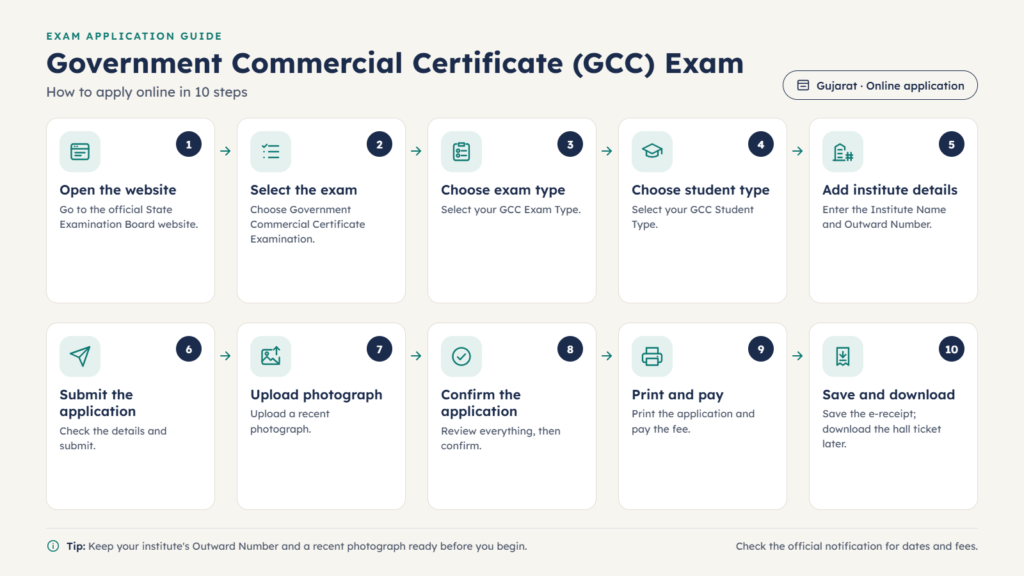
Step 1: Official SEB Portal ખોલો
ગુજરાત રાજ્ય પરીક્ષા બોર્ડની official application website ખોલો:
State Examination Board Gujarat – GCC Application
Step 2: Government Commercial Certificate Examination પસંદ કરો
Apply Online page પર Government Commercial Certificate Examination (GCC) પસંદ કરો.
Official listingમાં આ પરીક્ષા માટે advertisement number સાથે અલગ application entry દર્શાવવામાં આવી છે.
Step 3: GCC Exam Type પસંદ કરો
Application portalમાં GCC Exam Type માટે option આપવામાં આવે છે.
તમને લાગુ પડતો પરીક્ષા પ્રકાર પસંદ કરો. જો multiple options દેખાય અને યોગ્ય પસંદગી અંગે શંકા હોય, તો institute અથવા official notificationની મદદ લો.
Step 4: GCC Student Type પસંદ કરો
Portalમાં GCC Student Type પસંદ કરવાનું રહેશે.
આ field ખોટી પસંદ કરવાથી applicationમાં mismatch થઈ શકે છે, તેથી submit પહેલાં ફરીથી ચકાસો.
Step 5: Institute Name અને Outward Number भरो
Official GCC registration page પર:
- Institute Name
- Outward Number
માગવામાં આવે છે.
આ વિગતો institute પાસેથી મેળવીને જ દાખલ કરો. અંદાજે અથવા ખોટી વિગતો ભરશો નહીં.
Step 6: Application Submit કરો
મૂળ application details દાખલ કર્યા પછી form submit કરો અને system-generated application information સાચવી રાખો.
Step 7: Photograph Upload કરો
SEB portalના official workflowમાં Upload Photograph અલગ તબક્કા તરીકે દર્શાવવામાં આવ્યો છે. Photograph upload થયા પછી preview અથવા confirmationમાં image યોગ્ય રીતે દેખાય છે કે નહીં તે તપાસો.
Step 8: Application Confirm કરો
Application confirm કર્યા વગર form પૂર્ણ માનવામાં આવતો નથી.
Portalમાં Confirm Application optionનો ઉપયોગ કરીને final confirmation પૂર્ણ કરો. Confirmation number મળ્યો હોય તો તેને નોંધો.
Step 9: Application Print અને Fee Pay કરો
Official portalમાં Print Application/Fee Pay option ઉપલબ્ધ છે. Confirmation પછી application print અને applicable fee paymentની પ્રક્રિયા પૂર્ણ કરો.
Step 10: E-Receipt સાચવો
SEB portalમાં GCC માટે Print Receipt facility ઉપલબ્ધ છે. Fee payment પછી receipt generate થાય તો તેની PDF અથવા print સાચવો.
Step 11: Hall Ticket અને Result માટે official portal ચેક કરો
Application process પૂર્ણ થયા પછી portal પર:
- Print Hall Ticket
- Print Result
માટે અલગ options ઉપલબ્ધ છે. Exam schedule અથવા hall-ticket release અંગે official update માટે SEB website નિયમિત રીતે તપાસો.
GCC Application માટે કઈ માહિતી તૈયાર રાખવી?
Official portal પર દેખાતી fieldsના આધારે નીચેની માહિતી તૈયાર રાખવી વ્યવહારુ છે:
| માહિતી | શા માટે જરૂરી |
|---|---|
| GCC Exam Type | યોગ્ય પરીક્ષા પસંદ કરવા |
| GCC Student Type | ઉમેદવારની યોગ્ય category પસંદ કરવા |
| Institute Name | institute સંબંધિત registration માટે |
| Outward Number | institute-side application reference માટે |
| Photograph | application upload માટે |
| Confirmation details | final form અને payment માટે |
| Date of Birth | portal verification માટે, જો માંગવામાં આવે |
| Contact details | communication અથવા login માટે, જો માંગવામાં આવે |
નોંધ: સંપૂર્ણ mandatory document checklist અથવા fee amount માટે official notification/portal પર દર્શાવેલી current વિગતોને અંતિમ માનવી.
Fee વિશે સત્તાવાર સ્થિતિ
ઉપલબ્ધ official application listingમાં GCC Examination માટે last date દર્શાવવામાં આવી છે અને portal પર Print Application/Fee Pay તથા Print Receipt options ઉપલબ્ધ છે. પરંતુ જાહેર search resultમાં ચોક્કસ fee amount સ્પષ્ટ રીતે દર્શાવવામાં આવ્યો નથી.
તેથી:
- feeની રકમ portalમાં payment stage પર તપાસો,
- payment પહેલાં final amount ચકાસો,
- payment પછી receipt સાચવો,
- અને fee અંગે કોઈ શંકા હોય તો official notification અથવા SEBની માહિતીનો આધાર લો.
ચોક્કસ fee amountને આ લેખમાં નિશ્ચિત રીતે દર્શાવવામાં આવ્યો નથી, કારણ કે ઉપલબ્ધ સત્તાવાર જાહેર માહિતીમાંથી તે સ્પષ્ટ રીતે ચકાસી શકાયો નથી.
Application કરતી વખતે સામાન્ય ભૂલો ટાળો
- ખોટો GCC Exam Type પસંદ ન કરો.
- GCC Student Typeમાં અંદાજે option ન પસંદ કરો.
- Institute Name ખોટું ન ભરશો.
- Outward Number institute પાસેથી ચકાસ્યા વગર દાખલ ન કરો.
- Photograph upload કર્યા પછી preview તપાસો.
- Application confirm કર્યા વગર fee payment તરફ ન વધો.
- Confirmation number અને receipt સાચવો.
- છેલ્લી તારીખના દિવસે technical issueનું જોખમ ન લો.
Application confirmation અને payment વચ્ચેનો તફાવત
આ બે તબક્કા અલગ છે:
| તબક્કો | અર્થ |
|---|---|
| Confirm Application | Formની વિગતો final કરીને submit કરવી |
| Fee Pay | લાગુ fee ચૂકવવી |
| Print Receipt | paymentનો પુરાવો મેળવવો |
| Print Hall Ticket | પરીક્ષા માટેનું પ્રવેશપત્ર મેળવવું |
Portalના અલગ અલગ menu પરથી આ તબક્કાઓ ઉપલબ્ધ છે, તેથી માત્ર form ભરવાથી અરજી પૂર્ણ થઈ ગઈ છે એવું માનવું નહીં.
જો fee debit થાય પરંતુ e-receipt ન મળે તો?
SEBના official print-form/challan page પર સૂચના છે કે fee debit થયેલી હોય અને e-receipt તરત ન દેખાય, તો થોડા સમય પછી અથવા બીજા દિવસે receipt માટે ફરી તપાસ કરવી. જો receipt generate ન થાય, તો portal પર દર્શાવેલી official સૂચના મુજબ આગળની પ્રક્રિયા તપાસો.
GCC Application Status અથવા Receipt કેવી રીતે મેળવવી?
SEB portal પર GCC માટે:
- Print Application/Fee Pay
- Print Receipt
- Print Hall Ticket
- Print Result
વિકલ્પો ઉપલબ્ધ છે.
Receipt અથવા form print કરવા માટે confirmation number અને date of birth જેવી વિગતો માંગવામાં આવી શકે છે.
Frequently Asked Questions
GCC પરીક્ષા એટલે શું?
GCC એટલે Government Commercial Certificate Examination. ગુજરાત રાજ્ય પરીક્ષા બોર્ડ આ ટાઈપ (typing) અને સ્ટેનો (shorthand) ની પરીક્ષા લે છે, જે પાસ કરનારને સરકારી commercial certificate મળે છે.
GCC Exam 2026 માટે અરજીની છેલ્લી તારીખ કઈ છે?
ગુજરાત રાજ્ય પરીક્ષા બોર્ડના official application portal મુજબ છેલ્લી તારીખ 25 નવેમ્બર 2026 છે.
GCC Exam માટે અરજી ક્યાં કરવી?
State Examination Board, Gujaratના official portal sebexam.org પર અરજી કરવી.
GCC applicationમાં Institute Name શા માટે માંગવામાં આવે છે?
Official GCC registration page પર Institute Name અને Outward Number fields દર્શાવવામાં આવી છે. આથી institute-related information application processનો ભાગ છે.
Outward Number ક્યાંથી મળશે?
Outward Number માટે તમારા સંબંધિત instituteનો સંપર્ક કરો. આ field અંગે અંદાજે નંબર દાખલ ન કરો.
Photograph upload કરવો પડે છે?
હા. SEBના official workflowમાં Upload Photograph અલગ step તરીકે દર્શાવવામાં આવ્યો છે.
Application confirm કર્યા પછી શું કરવું?
Confirmation પછી application print અને fee payment પૂર્ણ કરો. ત્યારબાદ receipt સાચવો.
GCC Examની fee કેટલી છે?
ઉપલબ્ધ public official listingમાં ચોક્કસ fee amount દર્શાવવામાં આવી નથી. Fee payment stage પર portalમાં દર્શાવતી રકમ તપાસવી.
Hall Ticket ક્યાંથી મળશે?
SEB portalમાં Print Hall Ticket option ઉપલબ્ધ છે. Hall ticket release થયા પછી official portal પરથી મેળવવું.
Result ક્યાંથી ચેક કરવો?
SEBની official website પર Print Result option ઉપલબ્ધ છે.
Candidate Action Checklist
- Official SEB portal ખોલો
- GCC Examination પસંદ કરો
- GCC Exam Type ચેક કરો
- GCC Student Type યોગ્ય પસંદ કરો
- Institute Name મેળવો
- Outward Number ચકાસો
- Photograph upload કરો
- Application confirm કરો
- Application print અને fee payment પૂર્ણ કરો
- E-Receipt સાચવો
- 25 નવેમ્બર 2026 પહેલાં અરજી પૂર્ણ કરો
- Hall Ticket અને Result માટે official portal તપાસતા રહો
નિષ્કર્ષ
ગુજરાત રાજ્ય પરીક્ષા બોર્ડની Government Commercial Certificate Examination (GCC) માટે online application ચાલુ છે અને official portal પર 25 નવેમ્બર 2026 છેલ્લી તારીખ દર્શાવવામાં આવી છે.
અરજી કરતી વખતે માત્ર form ભરવું પૂરતું નથી. GCC Exam Type, Student Type, Institute Name, Outward Number, photograph upload, application confirmation, fee payment અને receipt—બધા તબક્કા પૂર્ણ કરવાના છે.
ચોક્કસ eligibility, fee અને exam schedule માટે છેલ્લી સત્તાવાર notification તથા SEB portal પર દર્શાવતી માહિતી જ અંતિમ માનવી.
આભાર — તમારા જવાબથી આ page સુધરશે.
InfoGuide સરકારી website નથી. અરજી પહેલાં official portal પર તાજી માહિતી ચકાસો.